Ellin Apps
Apps by Jeffrey Ellin
Support — SessionTracker
Frequently Asked Questions
Getting Started
How do I add a session?
Tap the + button on the Home tab. You can use “Quick Add” for fast entry or “Full Session” for more details.
How do I end an active session?
Tap on the active session from the Home screen, then tap “End Session” and enter your final amount.
What’s the difference between Quick Add and Full Session?
- Quick Add: Streamlined entry for starting a session quickly with just the buy-in amount
- Full Session: Complete form for entering all details including location, category, trip, and notes
Data & Sync
Is my data backed up?
If you have iCloud enabled, your data automatically syncs across all your devices signed into the same Apple ID.
How do I export my data?
Go to the Sessions tab, tap the export button (share icon), and choose where to save your CSV file.
How do I delete all my data?
You can delete individual sessions by swiping left on them in the Sessions list. To delete all data, you can delete and reinstall the app.
Categories & Locations
How do I add a new category?
Tap the menu icon (hamburger menu) and select “Manage Categories”, then tap the + button.
Trips
What are trips for?
Trips help you group sessions together, such as a weekend in Vegas or a cruise. You can view profit/loss summaries by trip.
Free Play Sessions
What is a Free Play session?
A Free Play session is a special session type for tracking casino promotional credits — free slot play, free table game credits, or any offer where the casino gives you credits to wager. It lets you measure your conversion rate: how much real cash you walked away with relative to the face value of the offer.
How do I record a Free Play session?
When adding or editing a session, toggle on Free Play Session in the Money section. Two fields will appear:
- Free Play Amount — the face value of the casino’s offer (e.g. $50)
- Cash Buy-in — any real money you had to put in alongside the free play (leave at $0 if none required)
Set your Cash Out amount when the session ends, just like a regular session.
What if I had to put in real cash alongside the free play?
Some casinos (like MGM properties) require you to cover bets with real money in addition to the free play credits. Enter that real cash amount in the Cash Buy-in field. The conversion rate calculation accounts for it automatically.
How is the Conversion Rate calculated?
Conversion Rate = (Cash Out − Cash Buy-in) ÷ Free Play Amount × 100
Examples:
| Scenario | Free Play | Cash Buy-in | Cash Out | Conversion Rate |
|---|---|---|---|---|
| Pure free play, good result | $50 | $0 | $35 | 70% |
| Mixed (MGM-style), strong win | $50 | $25 | $90 | 130% |
| Mixed, break-even | $50 | $25 | $25 | 0% |
| Lost everything | $50 | $0 | $0 | 0% |
A conversion rate above 0% means you got something back from the offer. Above 100% means you turned a profit on the free play (your net gain exceeded the face value).
Does Free Play profit count in my overall results?
Yes — by default, free play session results (cash out minus any cash buy-in) are included in your cumulative profit/loss and charts, since the cash you walk away with is real money. You can toggle this on the Insights tab using the gift icon (🎁) in the toolbar.
Charts & Summary (Included with Base App)
The Profit Over Time chart on the Summary screen is available to all users at no cost.
How does the Profit Over Time chart work with time filters?
The Profit Over Time chart on both the Home and Summary screens shows your cumulative profit/loss over time.
When a time filter is applied (e.g. “2026”, “This Month”), the chart carries over your cumulative total from all prior periods as a baseline starting point. This means the chart line starts at your ending position from the previous period, so you can see your absolute cumulative position while focusing on the selected time range.
Example:
- Your cumulative profit through end of 2025: $22,000
- You filter to “2026”
- The chart starts at $22,000 and plots 2026 sessions from there
The summary numbers (Sessions, Net Total) above the chart show only the profit/loss earned within the selected period, not including the baseline.
What does the “Change” percentage mean on the Summary screen?
The Change percentage shows the percentage change relative to your starting baseline for the selected time period.
Formula:
Change = (Period Profit/Loss ÷ Baseline Cumulative Profit) × 100
Example:
- Your cumulative profit entering 2026: $22,000 (baseline)
- Your 2026 profit so far: $1,366
- Change = $1,366 ÷ $22,000 × 100 = +6.2%
Notes:
- A positive percentage (green) means you grew your bankroll during this period
- A negative percentage (red) means you lost ground during this period
- For All Time, the baseline is 0 and Change shows 0% since there is no prior period to compare against
Insights Tab
The Insights tab is available to all users. Free Play Performance is always free. Advanced analytics require a Premium subscription.
Free Play Performance (Free)
The Free Play Performance card appears on the Insights tab whenever you have Free Play sessions recorded. It shows:
- Offered — total face value of all free play you’ve received
- Cashed Out — total cash you’ve walked away with from those sessions
- Sessions — number of free play sessions recorded
- Conversion Rate — your overall net return on free play offered, as a percentage
The conversion bar gives you a quick visual read: green (≥80%), orange (≥40%), red (below 40%).
The card respects the time filter at the top of the Insights tab, so you can see your free play performance for any period.
Excluding Free Play from other charts
Tap the gift icon (🎁) in the toolbar on the Insights tab to toggle whether free play sessions are included in your other charts (Bankroll Health, Profit by Location, Win Rate, etc.). This lets you see your “real money only” analytics separately. The Free Play Performance card is always shown regardless of this setting.
Premium Features
Premium subscribers get access to advanced analytics charts on the Insights screen. All charts below require a Premium subscription.
Win/Loss Rate by Category
A donut chart showing win or loss rate for each category. Swipe left/right to toggle between Win Rate and Loss Rate views.
How to read the chart:
The chart displays two dimensions of information:
- Slice size = Number of sessions (how much you play this category)
- Percentage label = Win/loss rate (how often you win or lose)
This design helps you spot patterns:
- Large slice + low win rate = Problem area (you play it often but lose frequently)
- Small slice + high win rate = Opportunity (you’re good at it but don’t play much)
- Large slice + high win rate = Your strength (keep doing what works!)
Win Rate Formula:
Win Rate = (Sessions with Profit > $0 ÷ Total Sessions) × 100
Loss Rate Formula:
Loss Rate = (Sessions with Profit < $0 ÷ Total Sessions) × 100
Profit by Location
A bar chart showing your total profit or loss at each casino/location. Helps identify which venues are most profitable for you.
Best Playing Times
A heatmap grid showing your average profit/loss by day of the week and time of day. Each cell is colored from red (worst) through gray (break-even) to green (best).
Time blocks:
- Morning — 6:00 AM to 11:59 AM
- Afternoon — 12:00 PM to 4:59 PM
- Evening — 5:00 PM to 9:59 PM
- Late Night — 10:00 PM to 5:59 AM
Bankroll Health
A summary card showing an overall health label based on three normalized factors: Net Trend, Volatility per Hour, and Comp Offset Ratio. Tap the card to drill down into raw metrics.
Stability Factors
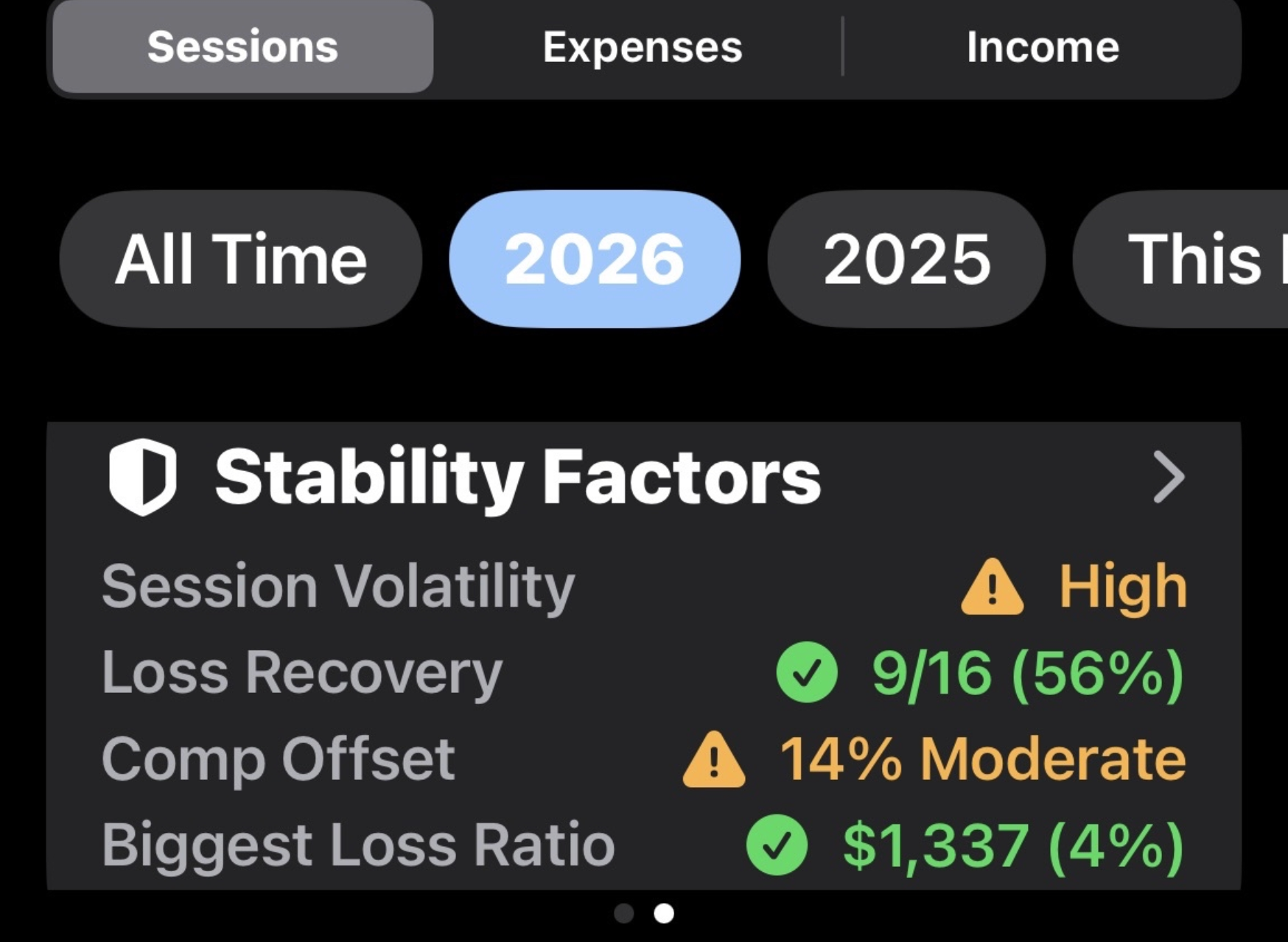
A companion card to Bankroll Health that focuses on behavioral patterns: Session Volatility, Loss Recovery Rate, Comp Offset, and Biggest Loss Ratio.
Duration vs Profit
A scatter plot showing the relationship between session duration and profit/loss.
Troubleshooting
The app won’t open
Try force-quitting and restarting the app. If the problem persists, restart your device.
My data isn’t syncing
- Ensure you’re signed into iCloud
- Check that iCloud is enabled for SessionTracker in Settings > [Your Name] > iCloud
- Ensure you have an internet connection
Charts aren’t showing any data
Charts only display completed sessions. Make sure you have ended some sessions with final amounts.
Contact Us
If you need further assistance or want to report a bug, please fill out our support form:
We typically respond within 24-48 hours.
Responsible Gaming Resources
If you or someone you know needs help with problem gambling:
- National Council on Problem Gambling: 1-800-522-4700
- Gamblers Anonymous: www.gamblersanonymous.org
- National Problem Gambling Helpline: Available 24/7